Table or source
Table 12, bar rail, patio, host stand, receipt, exit prompt, event room, or another source-specific QR location.
Restaurant Manager Alerts
GuestRecovery turns private guest feedback into an actionable recovery signal. When a guest rates the experience below expectations, managers can see where the signal came from, what went wrong, and what needs to happen next.
Live recovery in action
The alert should be operational, not vague. Managers need table/source context, rating level, issue category, guest note, and recovery status so they can respond without hunting for details.
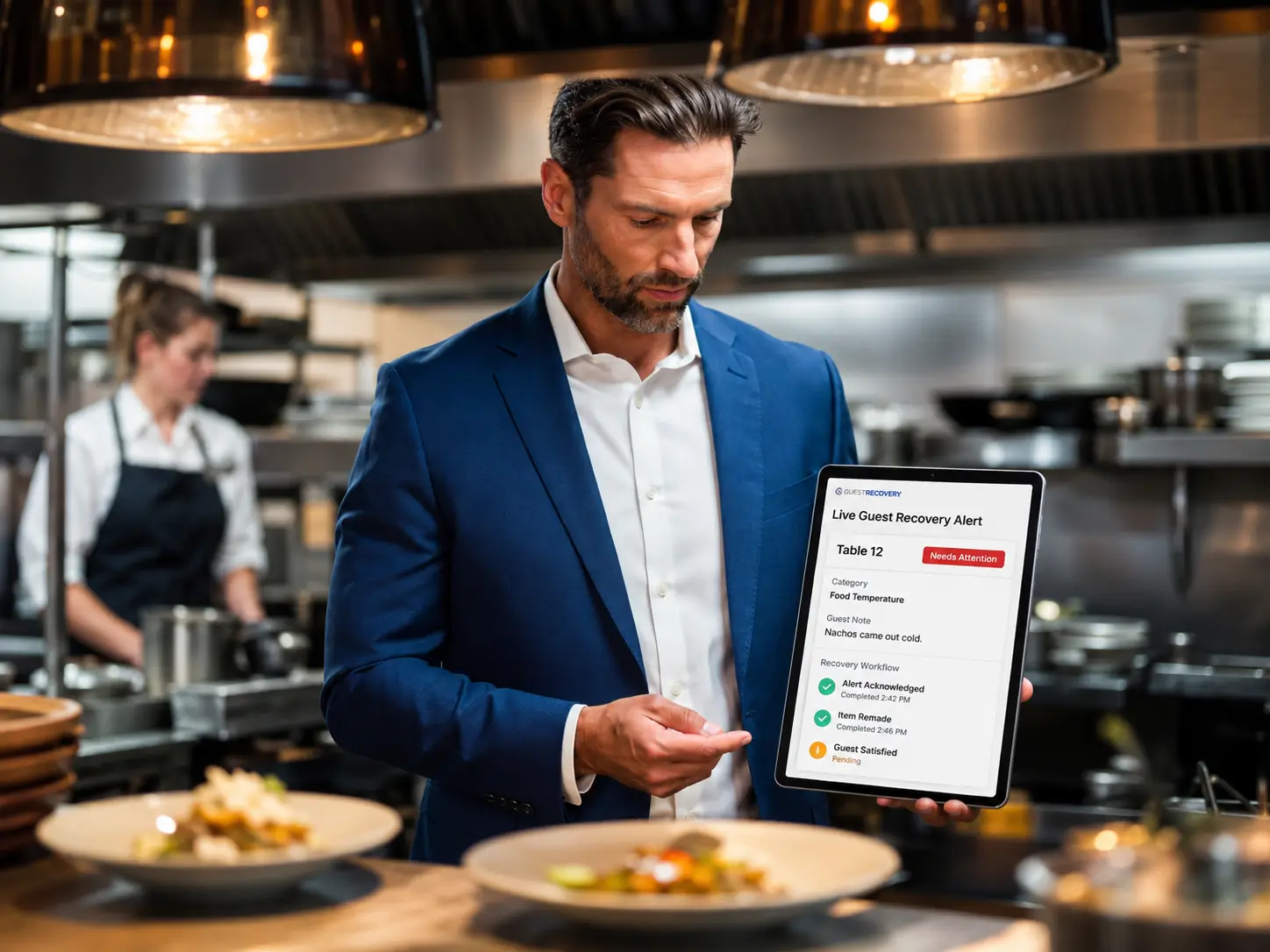
What the manager sees
A generic notification is not enough. The manager needs the operational context that turns feedback into a table visit, a remake, a service touch, or a recorded recovery.
Table 12, bar rail, patio, host stand, receipt, exit prompt, event room, or another source-specific QR location.
Whether the guest is happy, at risk, or actively signaling a less-than-five-star experience.
Food temperature, service speed, order accuracy, drink delays, cleanliness, wait time, staff attitude, or custom categories.
A short explanation, such as “nachos came out cold,” so the manager has context before reaching the table.
See when the signal came in and whether it still needs attention, acknowledgment, or follow-up.
New, acknowledged, in progress, resolved, escalated, guest satisfied, or follow-up needed.
Alert workflow
The guest should not have to hunt down help. The manager should not have to guess what happened. The workflow should move the signal to action as quickly as possible.
Step 1
The guest scans a table, receipt, exit, or host stand QR and shares what would make the visit better.
Step 2
The manager sees the source, category, guest note, and status while the guest may still be on-site.
Step 3
The acknowledgment stops the signal from being invisible and creates the start of an accountability record.
Step 4
Remade item, manager table touch, comp, adjustment, apology, follow-up, or another action can be logged.
Step 5
The manager records whether the guest was satisfied, unresolved, or needs additional follow-up.
Step 6
The signal becomes part of the Experience Gap Report, helping leadership see repeat issues.
Escalation support
Restaurants can design alert rules around their operation. A floor manager, GM, or regional leader should be able to see unresolved signals before the recovery window closes.
A low rating or urgent recovery signal can notify the manager on duty with the table/source and issue category.
If a manager taps “acknowledged,” the team knows someone is handling it. If not, the signal can remain visibly unresolved.
A restaurant can configure workflows to route unresolved signals to another manager, GM, or leadership contact.
Manager accountability
This is where GuestRecovery becomes more than a feedback form. It helps restaurants see whether signals were acknowledged, whether managers responded, what action was taken, and what outcome was recorded.
Track how long it took for a signal to be acknowledged and acted on.
Capture useful context such as check number, server name, action taken, guest reaction, and follow-up needs.
Close the loop with an outcome such as guest satisfied, item remade, comped, unresolved, or follow-up needed.
The quiet guest problem
Manager alerts matter because many guests avoid confrontation. A quiet QR signal gives them a way to say something without making the situation awkward. That gives the manager a chance to save the visit while there is still time.
The guest says nothing, leaves disappointed, and the restaurant finds out later through a public review or lost repeat visit.
The guest submits a private signal, the manager sees the table/source, and the restaurant has a chance to fix the experience.
FAQs
It is a private operational signal that notifies management when a guest submits low-rated feedback or a concern that may need attention.
Source-specific QR links can automatically identify the table, section, receipt, host stand, exit prompt, or other source.
No. Table/source QR links, manager notes, and recovery fields can support the workflow without POS integration.
GuestRecovery can support escalation rules so unresolved signals can be routed to additional managers or leadership contacts.